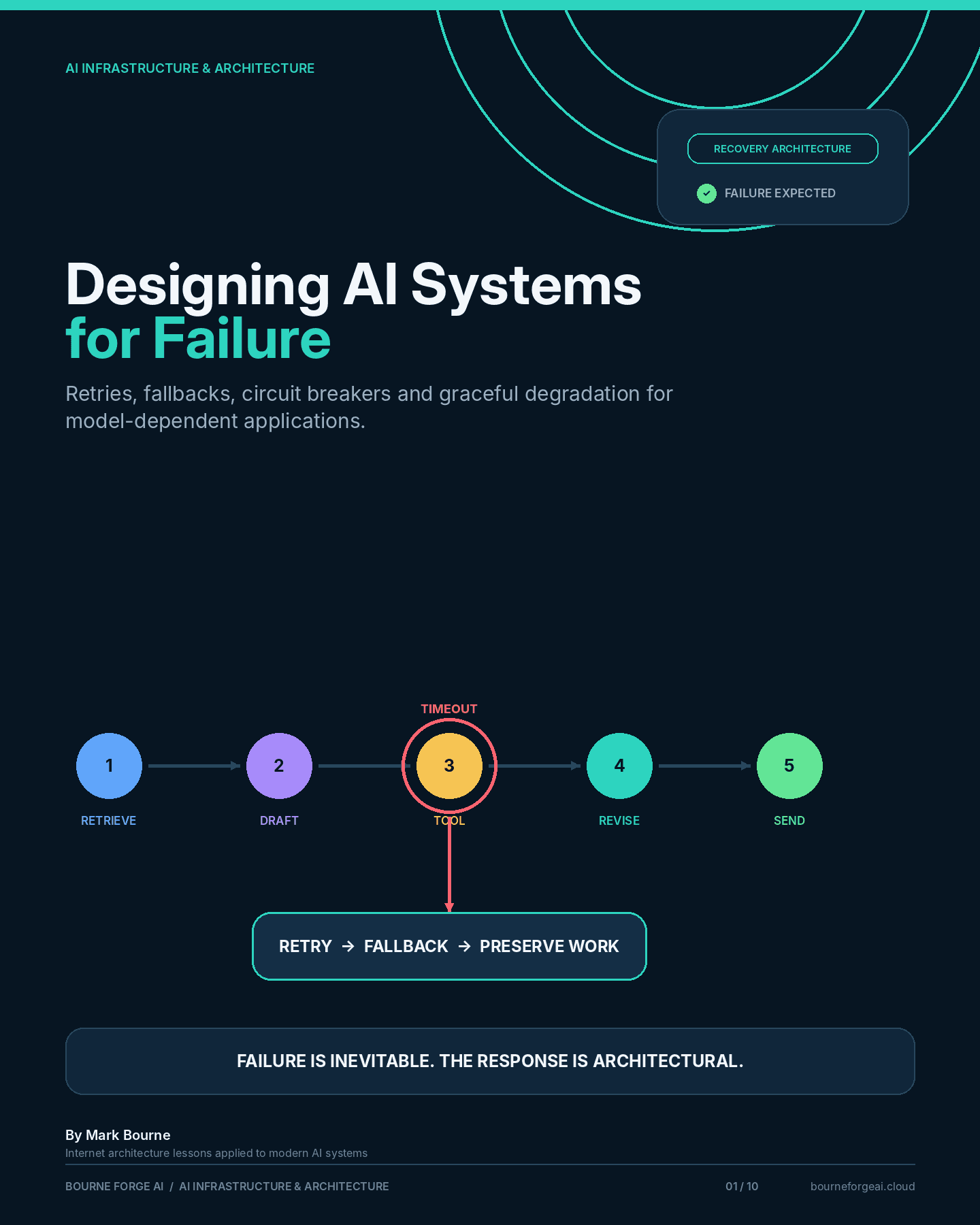
Designing AI Systems for Failure
Retries, fallbacks, circuit breakers and graceful degradation for model-dependent applications.
By Mark Bourne
Introduction
Defining Reliability for AI Systems argued that reliability has to be measured before it can be engineered.
This article is about the engineering.
Every model-dependent application will, eventually, have a bad day: a provider outage, a rate limit, a malformed tool response, a retrieval index returning nothing useful. The question that determines whether the application is production-grade is not whether this happens—it will—but what happens next.
A system that has never been asked “what happens when this fails?” will answer that question for you, at the worst possible time.
This piece works through the common ways AI workflows fail, and the patterns—retries, circuit breakers, fallbacks, degraded modes, human escalation—that keep a failure from becoming an outage.
The Internet Lesson: Assume Failure, Design for Recovery
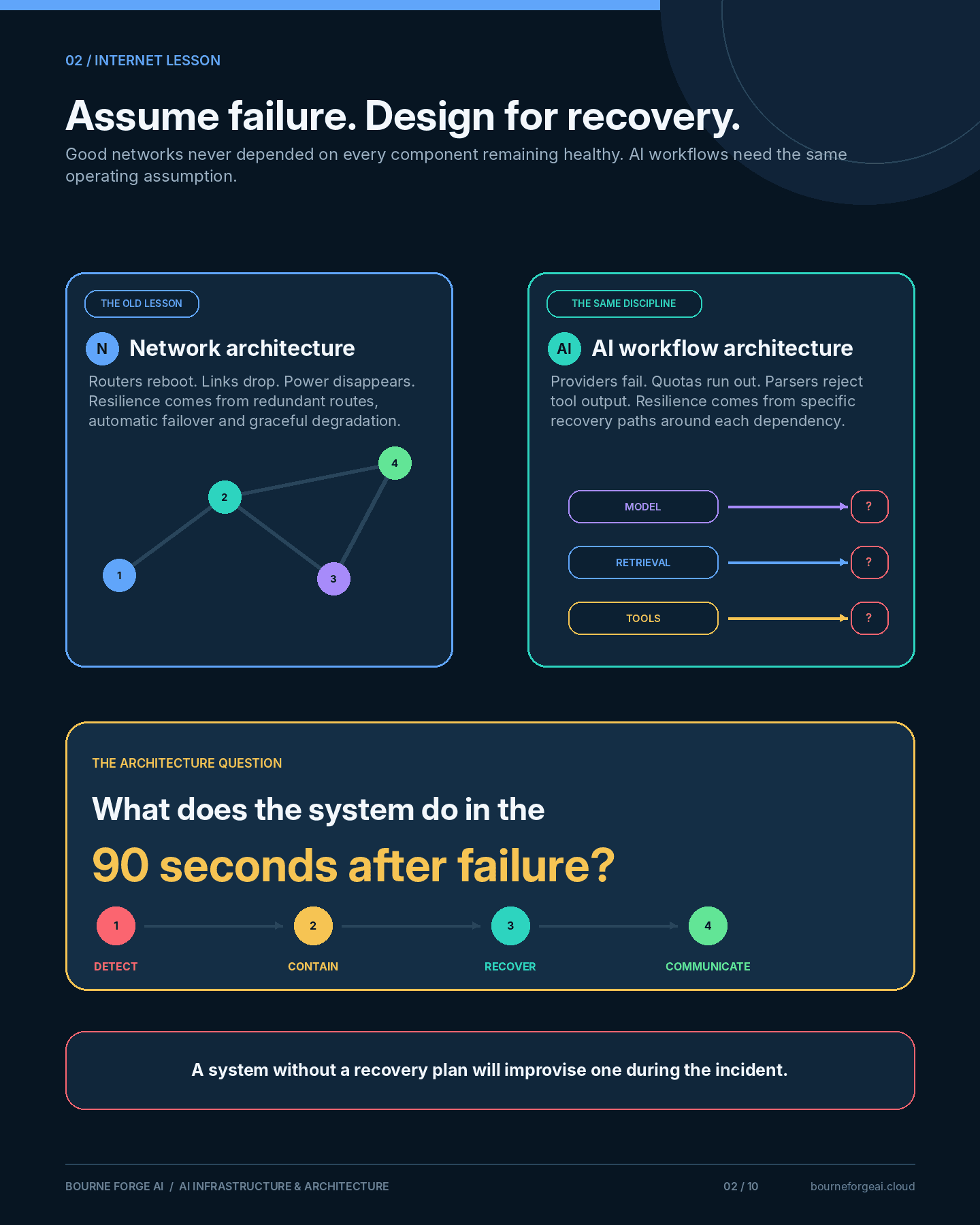
Networks fail constantly.
Routers reboot. Links drop. Power disappears. Good network architecture never assumed otherwise—it assumed failure and built recovery paths around that assumption: redundant routes, automatic failover, graceful degradation under load.
AI workflows fail just as often, for reasons that are often outside your control: a provider having a bad night, a rate limit hit during a traffic spike, a tool returning something the parser didn't expect.
The architecture question isn't how to prevent every failure. It's what the system does in the ninety seconds after one occurs.
A Realistic Failure Scenario
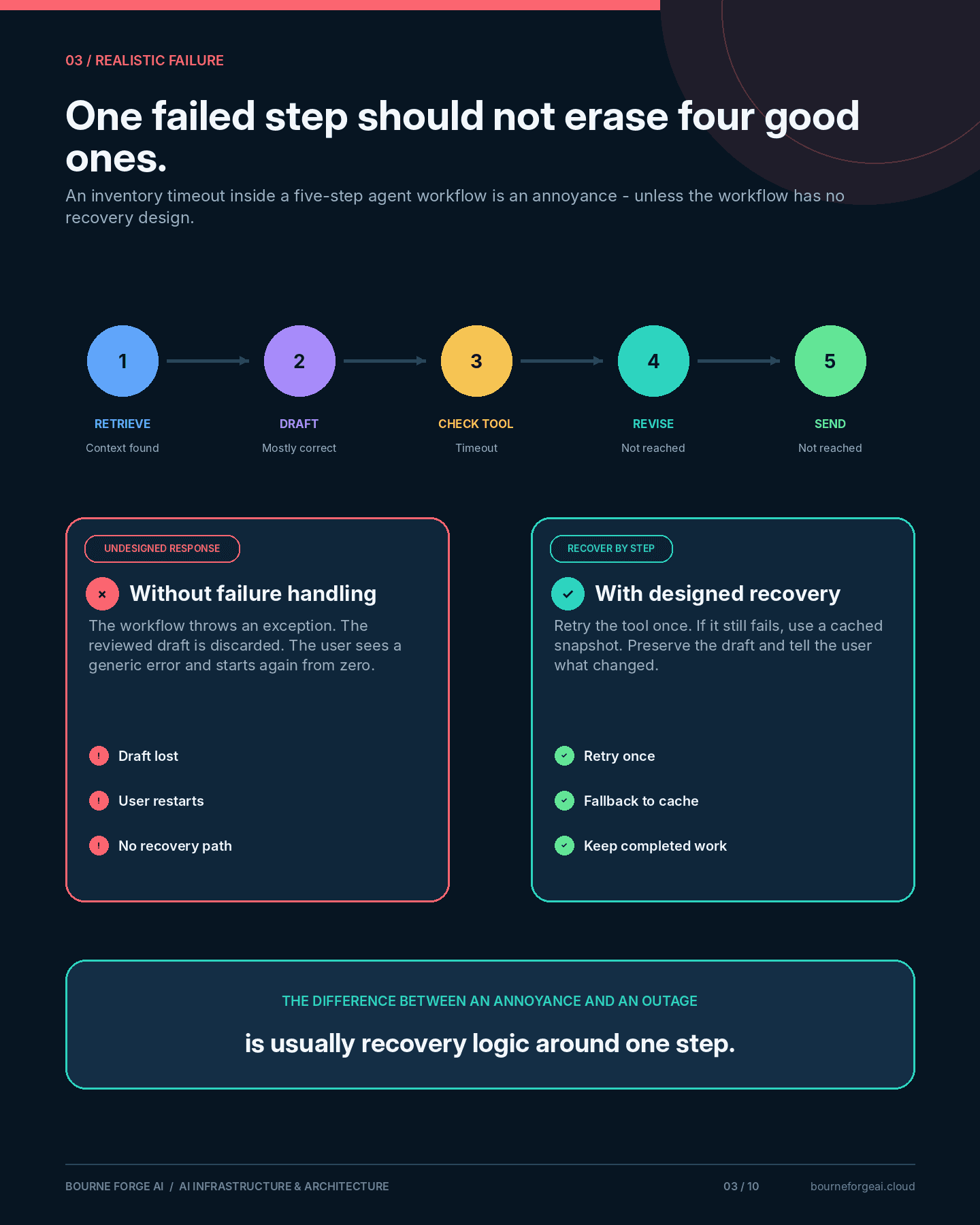
An agent is midway through a five-step workflow: retrieve context, draft a response, call a tool to check inventory, revise the draft, send.
The inventory tool times out. With no failure handling, the entire workflow throws an exception. The draft—already reviewed and mostly correct—is discarded. The user sees a generic error and has to start over from nothing.
None of that was necessary. The failure was in one step out of five. A well-designed system would retry the tool call once, fall back to a cached inventory snapshot if the retry also failed, and preserve the draft either way.
The difference between an annoyance and an outage is usually a few lines of failure handling around one step.
The Ways AI Workflows Actually Fail
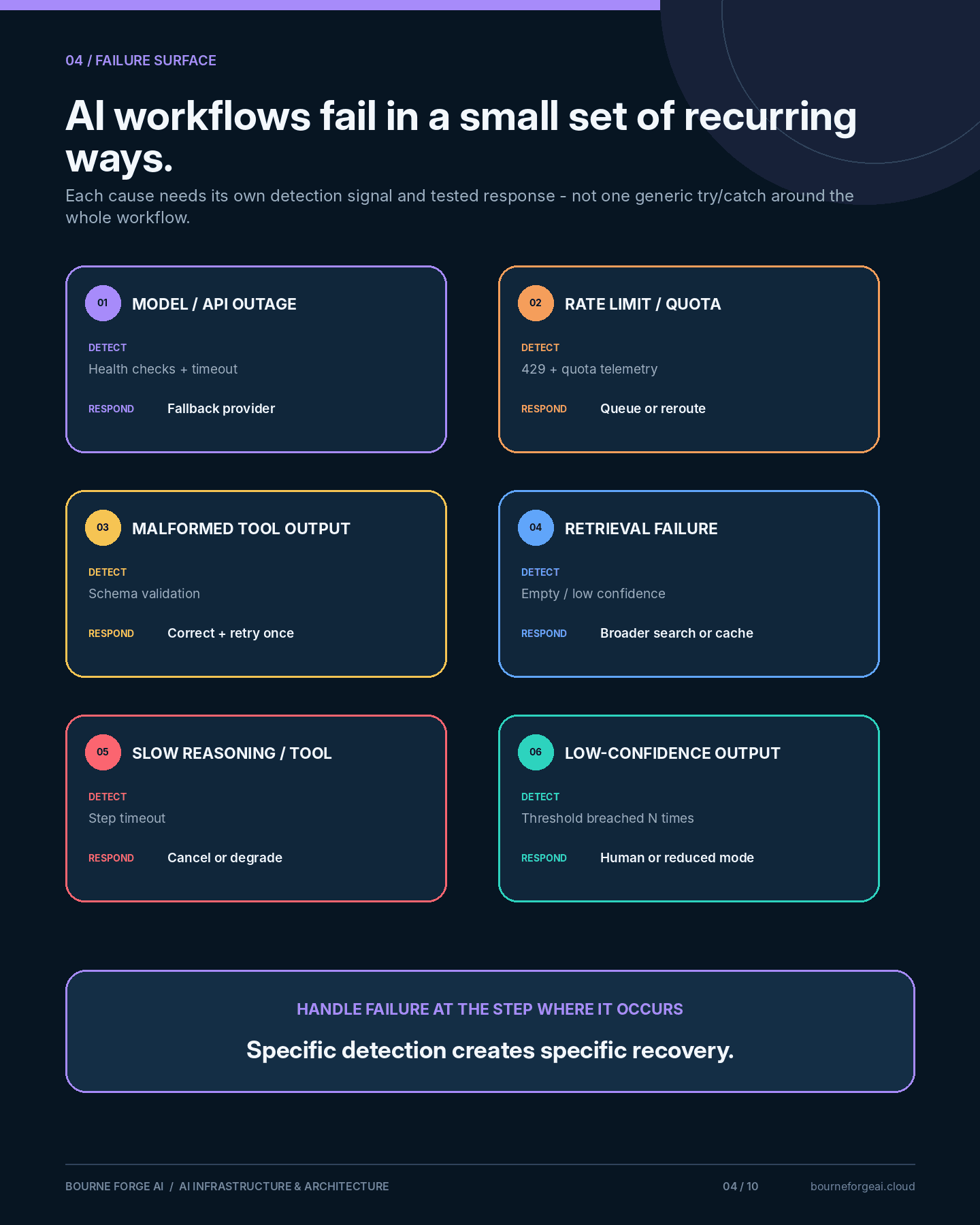
Most production incidents trace back to a small set of recurring causes:
- Model or API outage
- Rate limits and exhausted quotas
- Invalid or malformed tool responses
- Context retrieval returning nothing, or the wrong thing
- Timeouts on slow reasoning or long tool calls
- Repeated low-confidence or contradictory output
Each of these needs a specific, tested response—not a single generic try/catch around the whole workflow.
Retry Strategies (and Retry Storms)
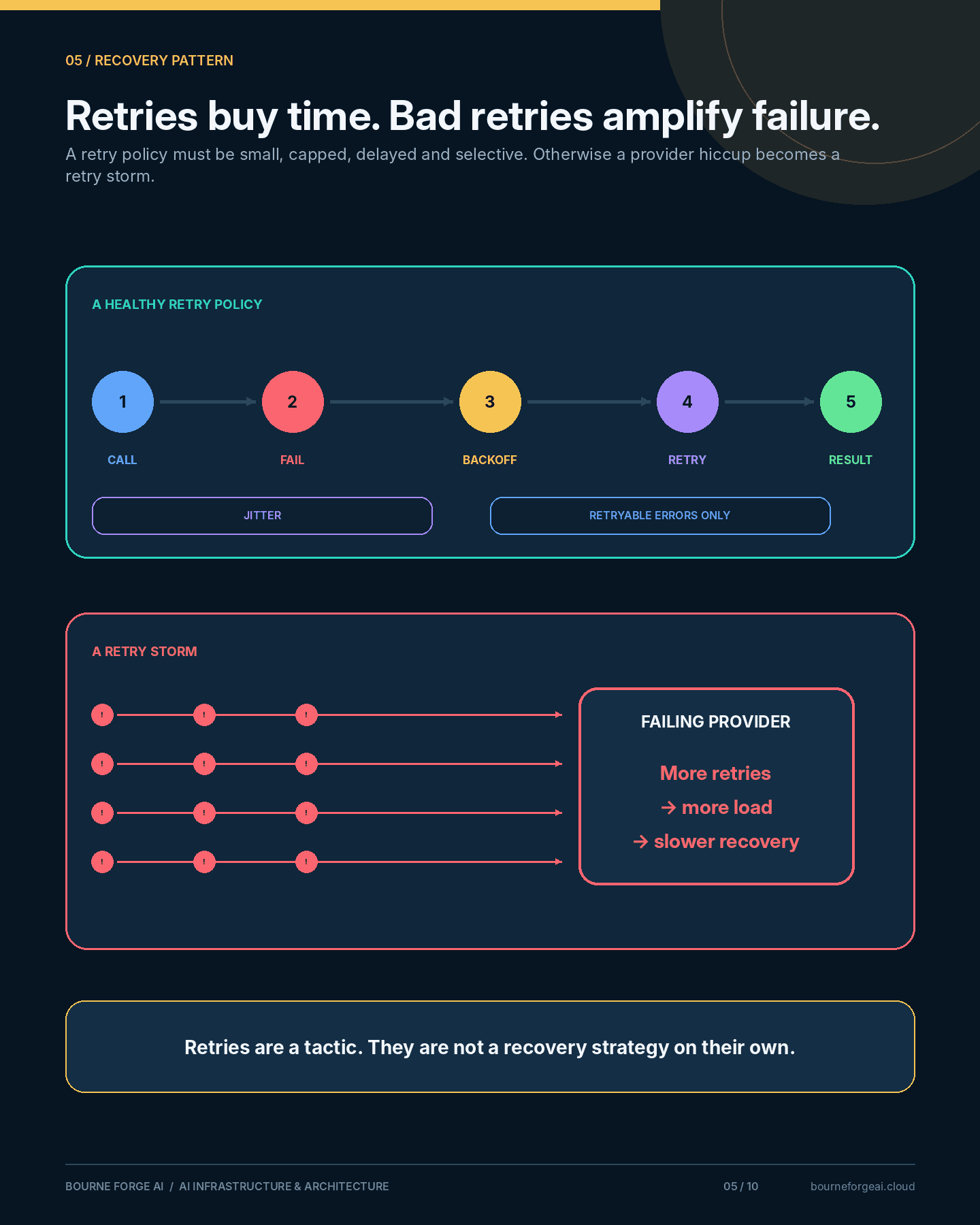
Retrying a failed call is the simplest recovery pattern, and the easiest one to get wrong.
Done well, a retry policy includes:
- A small, capped number of attempts
- Exponential backoff between attempts
- Jitter, so many clients don't retry in lockstep
- A distinction between retryable errors (timeouts) and non-retryable ones (bad request)
Done badly, retries turn a brief provider hiccup into a self-inflicted denial-of-service: every failed request immediately retries, multiplying load on a system that was already struggling. This is a retry storm, and it has taken down more services than the original outage ever would have.
Retries buy time. They are not a strategy on their own.
Circuit Breakers
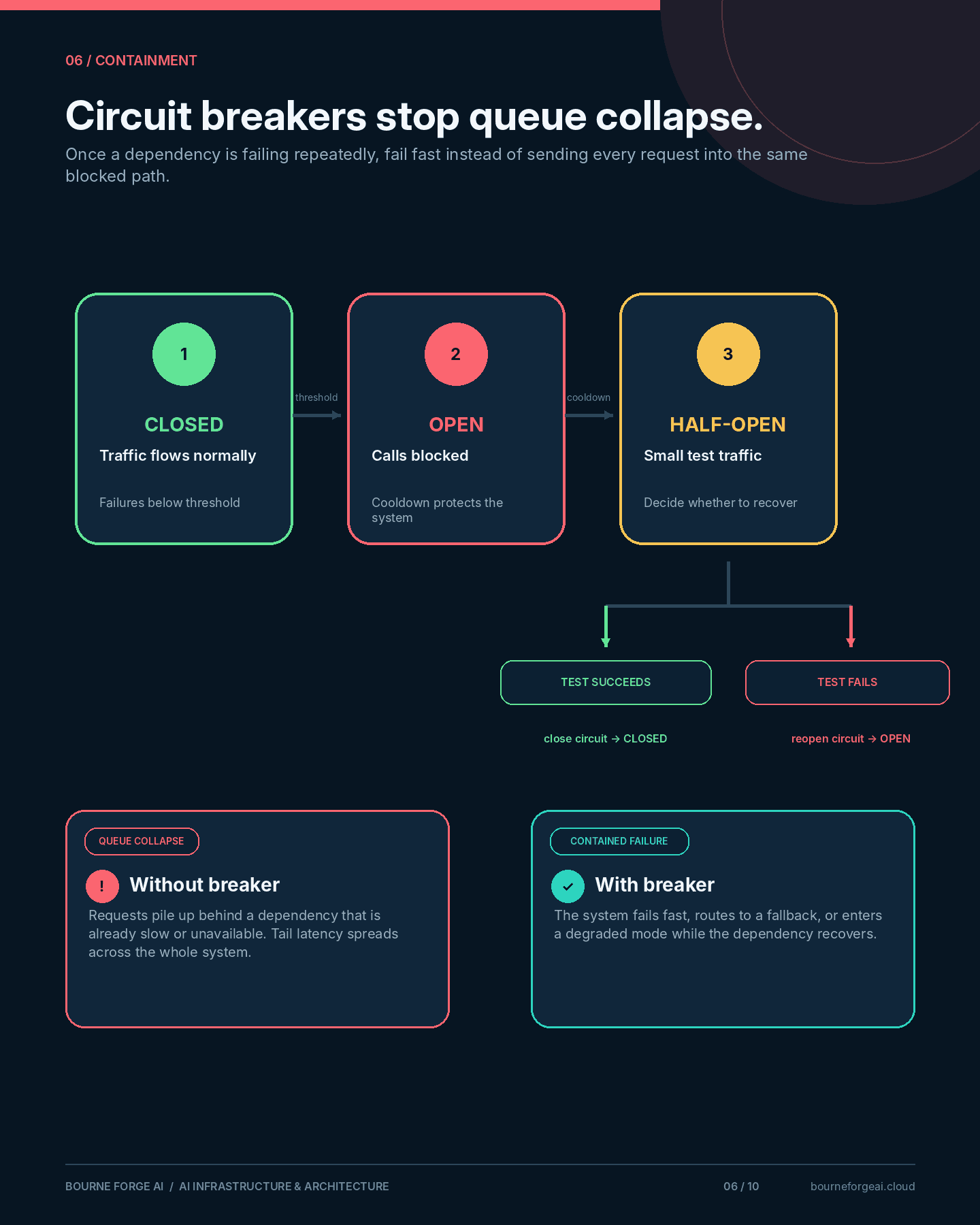
A circuit breaker stops calling a dependency once it has failed enough times in a row, instead of letting every request queue up behind a service that isn't responding.
After a cooling-off period, it allows a small number of test requests through. If they succeed, normal traffic resumes. If they don't, it stays open and keeps failing fast.
For AI workflows, this applies to model providers, retrieval services, and any tool call—anywhere a slow, failing dependency could otherwise back up an entire queue of user requests.
Fallback Models and Reduced-Capability Modes
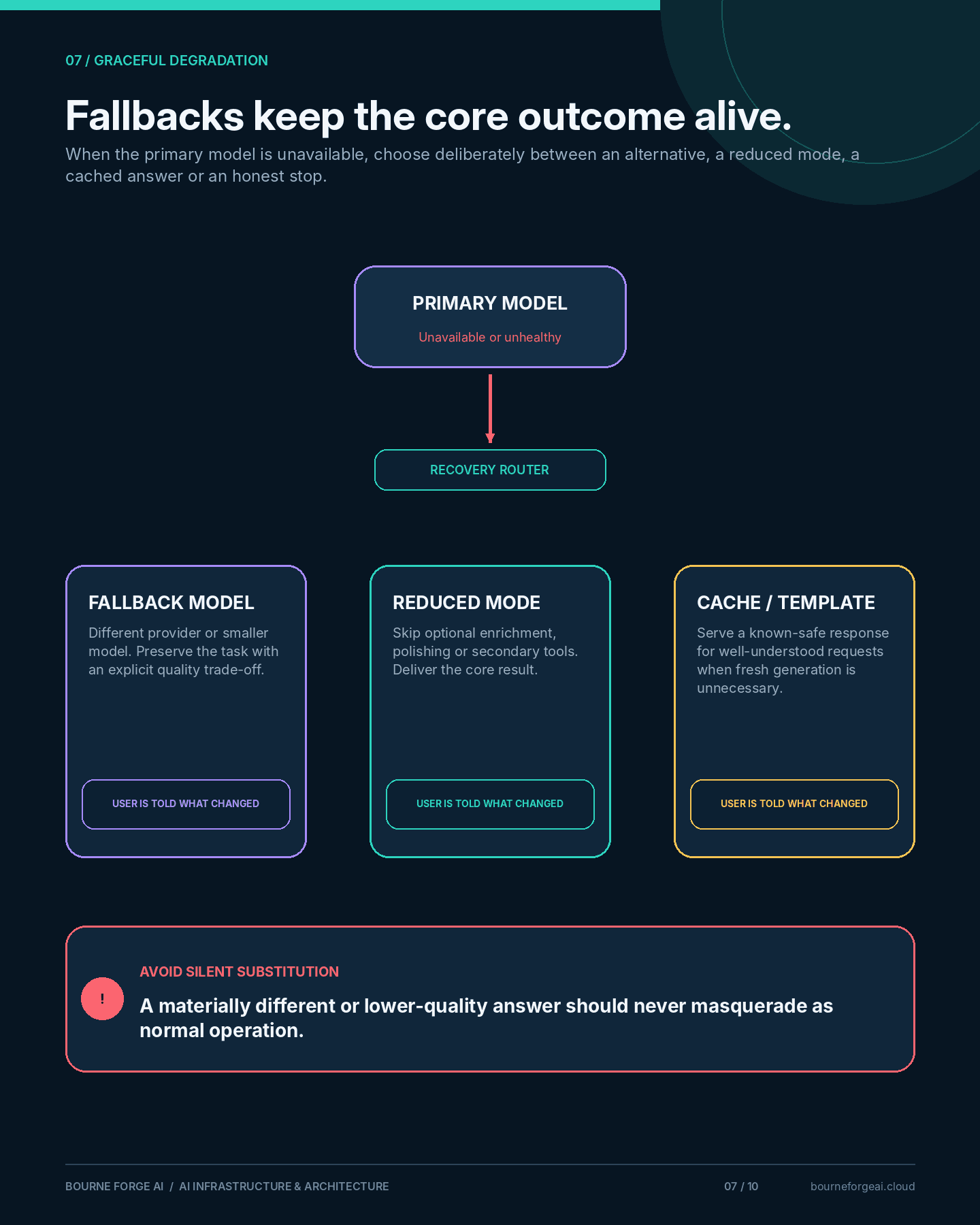
When the primary model or provider is unavailable, the workflow has three real options: fail outright, fall back to an alternative, or continue in a reduced-capability mode.
- Fallback model: a different provider or a smaller model steps in, possibly with a quality trade-off the user is told about
- Reduced-capability mode: skip the optional steps (tone polishing, tool-augmented enrichment) and deliver the core result
- Cached or templated response: for well-understood requests, serve a previously generated or templated answer instead of a fresh one
The failure mode to avoid is silent substitution—serving a materially different or lower-quality answer without telling the user anything changed.
Human Escalation
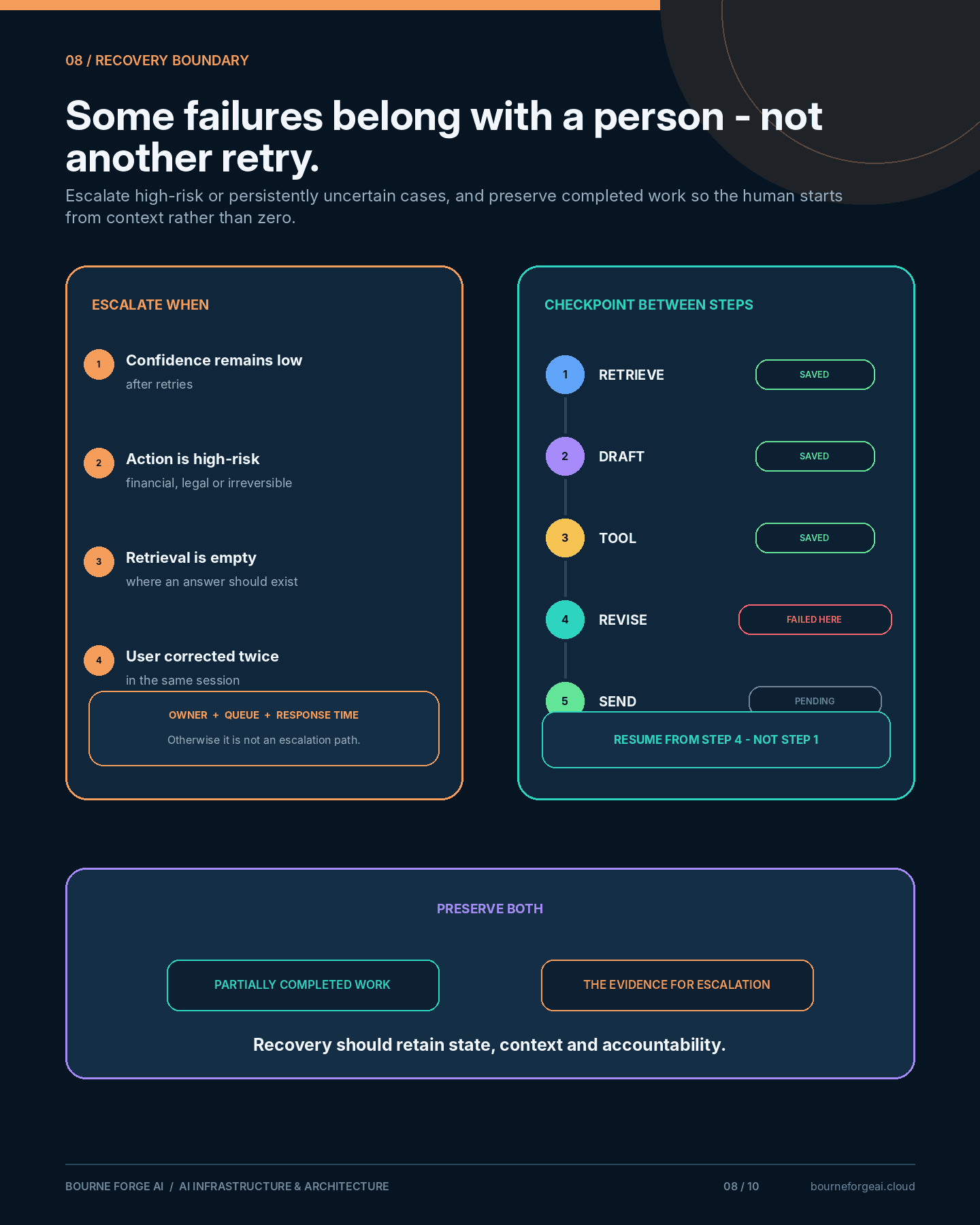
Some failures shouldn't be retried, faked around, or hidden behind a degraded mode. They should go to a person.
That requires the workflow to recognise, in advance, which situations warrant escalation:
- Confidence stays below threshold after retries
- The action is high-risk (financial, legal, irreversible)
- Context retrieval comes back empty for a question that clearly has an answer
- The user has already corrected the system twice in this session
An escalation path that only exists in theory is not an escalation path. It needs an owner, a queue, and a response-time expectation, the same as any other on-call rotation.
Preserving Partially Completed Work
Multi-step workflows fail partway through far more often than they fail at step one.
When step four of five fails, the output of steps one through three is usually still valid and often still valuable. Discarding it—forcing a full restart—wastes work the user has often already reviewed and approved.
Checkpoint state between steps. Resume from the last good step, not from zero.
A Failure-Mode Matrix
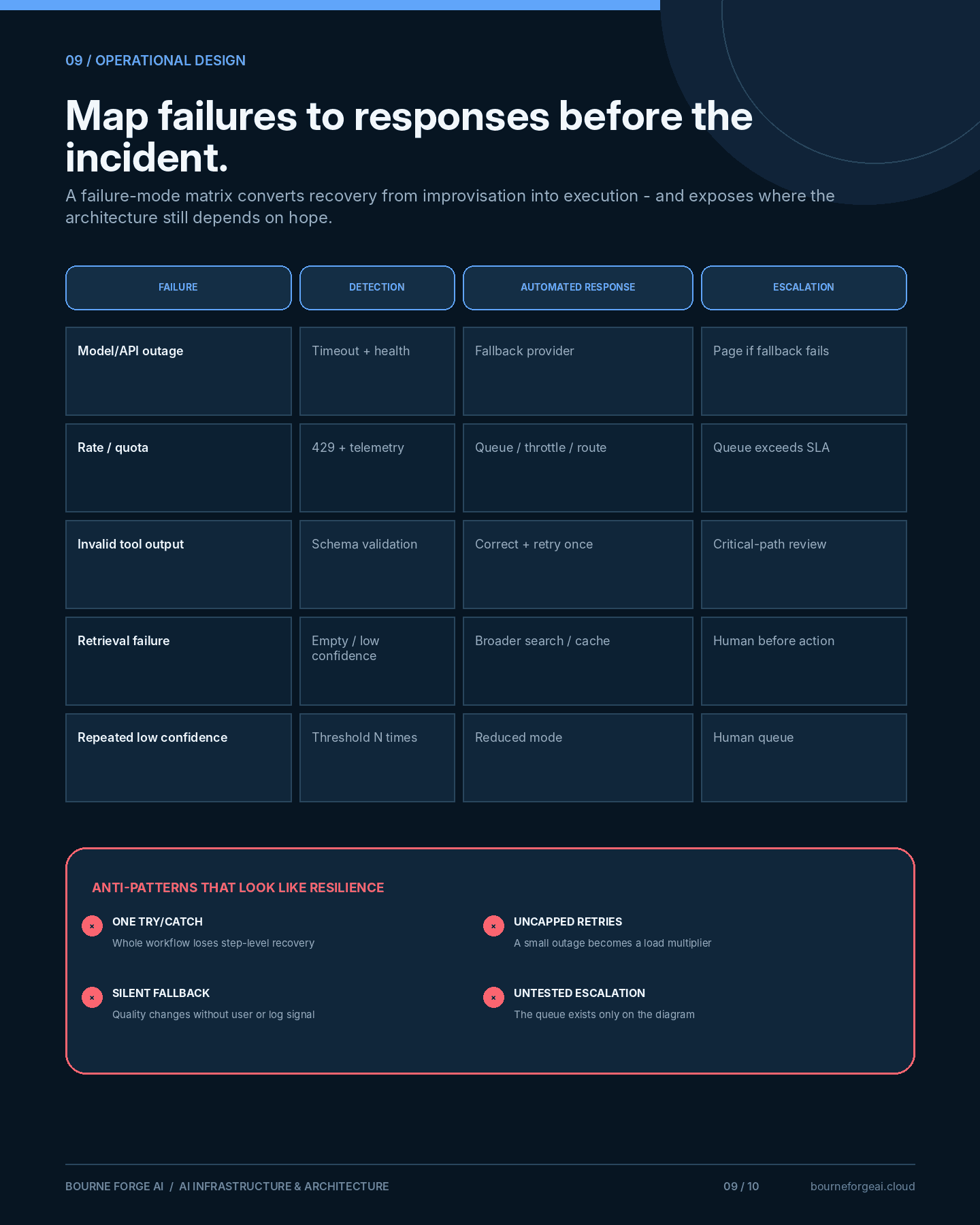
Mapping failures to responses in advance turns incident response from improvisation into execution:
| Failure | Detection | Automated response | Escalation |
|---|---|---|---|
| Model or API outage | Health checks, request timeouts | Switch to fallback model or provider | Page on-call if fallback also fails |
| Rate limit / quota exhausted | 429 responses, quota telemetry | Queue, throttle, or route to secondary provider | Notify owner if queue exceeds SLA |
| Invalid tool response | Schema validation on tool output | Retry once with corrected instructions, else abort step | Log for review; escalate if step is critical path |
| Context retrieval failure | Empty or low-confidence retrieval results | Fall back to broader search or cached context | Flag for human review before acting on thin context |
| Repeated low-confidence output | Confidence score below threshold, N times | Switch to reduced-capability mode | Route to human queue |
Trade-offs and Anti-Patterns
- Wrapping the entire workflow in one try/catch instead of handling each step's failure specifically
- Retrying without backoff or a cap, risking retry storms
- Falling back silently, with no signal to the user or the logs that quality changed
- Building escalation paths that are never tested until the day they're needed
- Over-engineering recovery for low-stakes workflows where a simple error message is genuinely fine
Not every workflow needs circuit breakers and fallback models. The level of failure handling should match the cost of failure—a drafting tool and a payment approval flow do not need the same safety net.
Final Thoughts
Internet engineers stopped asking whether a link would fail and started asking what the network would do about it. That shift—from prevention to designed recovery—is what separates a demo from a system people can depend on.
Failure is not the incident.
An undesigned response to failure is.
A Practical Checklist
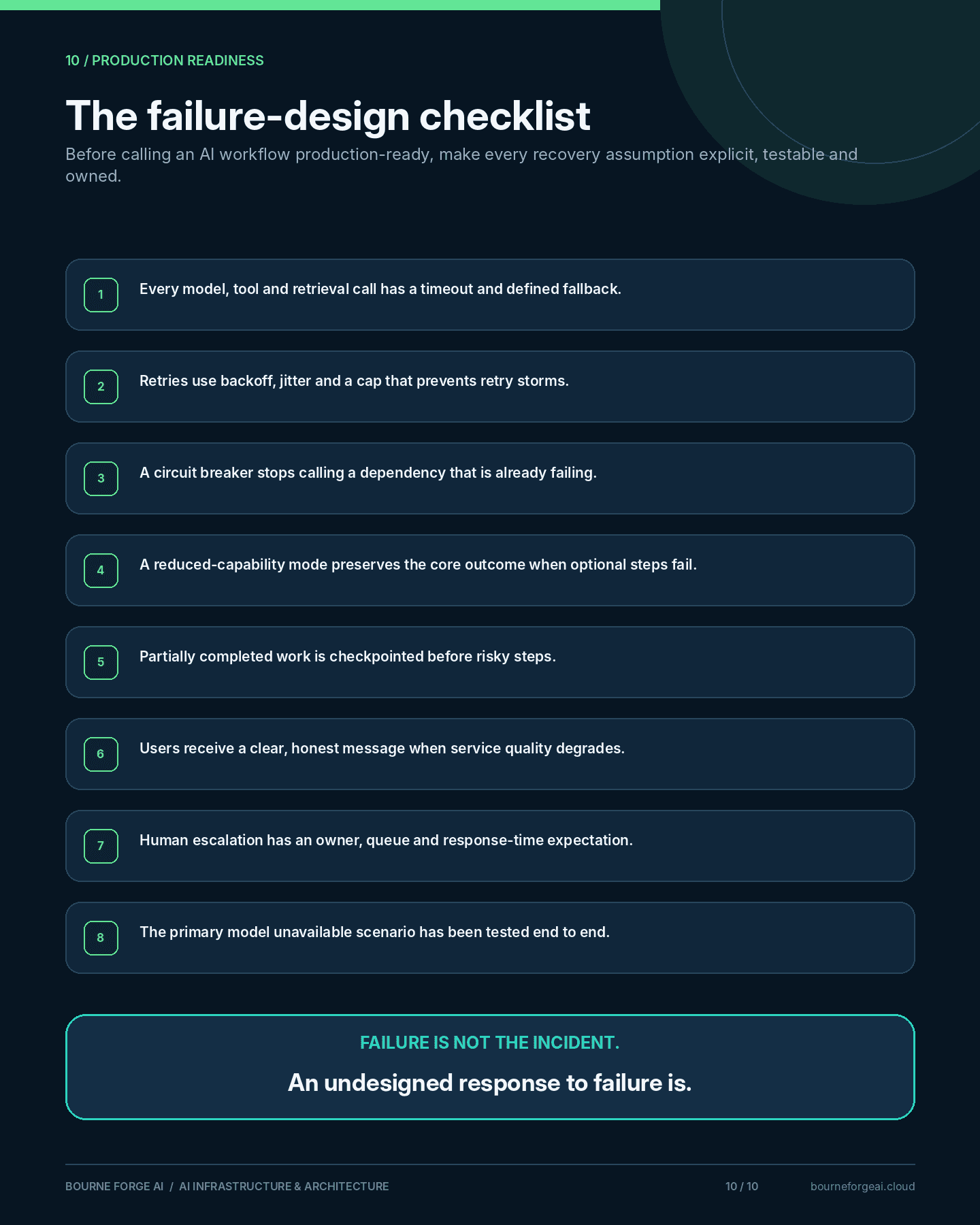
Before calling a workflow production-ready, work through these questions:
- 1Does every external call (model, tool, retrieval) have a timeout and a defined fallback?
- 2Is there a retry policy with backoff, and a cap that prevents retry storms?
- 3Is there a circuit breaker that stops calling a provider that's already failing?
- 4Is there a reduced-capability mode, or does any failure take the whole workflow down?
- 5Is partially completed work saved before a step that might fail?
- 6Does the user get a clear, honest message when the system degrades?
- 7Is there a defined path to a human when automation can't recover?
- 8Have you tested what happens when the primary model is simply unavailable?
About This Series
This article is part of the AI Infrastructure & Architecture series on Bourne Forge AI. It follows Defining Reliability for AI Systems by turning reliability targets into concrete failure-handling patterns, ahead of the next article on observability for non-deterministic systems.
More from the Notes
Short technical notes and observations, written up as experiments produce something worth documenting.
Was this useful?
Published